
Photo to woodcut print: Flux 2 Flex edit, then a 1-bit threshold
Make a woodcut from a photo with Flux 2 Flex on Sume at $0.0625, then force true 1-bit black and white in Pillow so the file is ready for print.
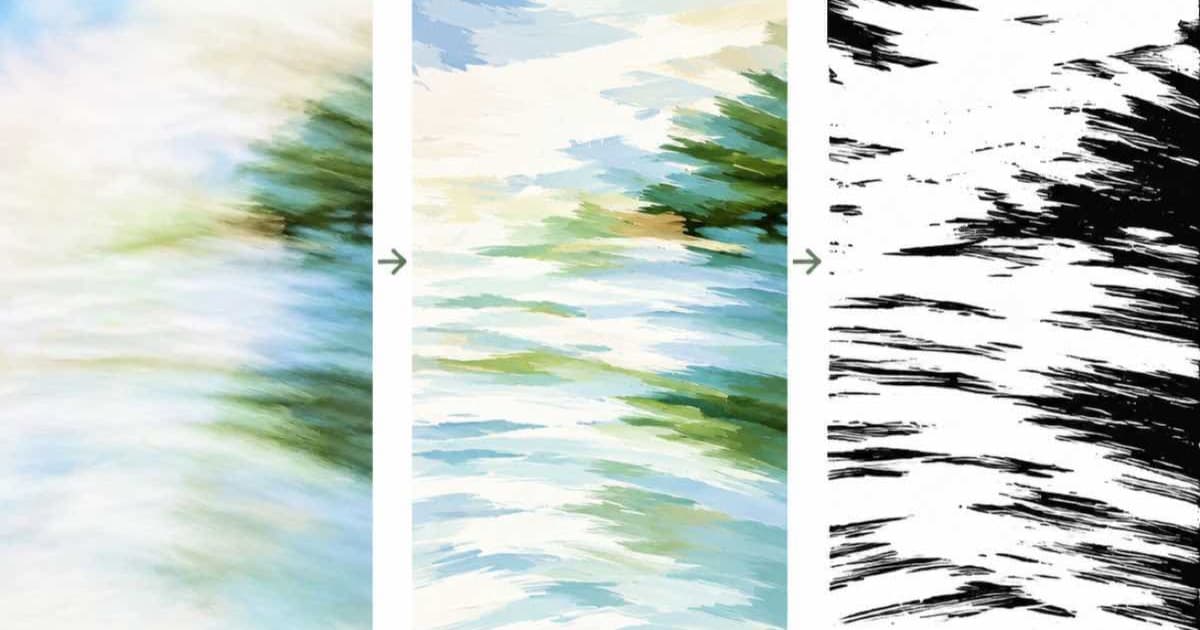
To turn a photo into a woodcut on Sume, send it as an input_references entry to black-forest-labs/flux.2-flex with a prompt for bold black carved lines on white, pin an aspect ratio the row lists, then threshold the result in Pillow with convert("L").point(...) and convert("1") so every pixel is pure black or white. The Sume catalog price for this row is $0.0625 per image, so three candidate cuts cost $0.1875.
Why add a threshold after the model?
A model can return a woodcut-like picture with soft gray anti-aliasing, and gray is the thing a block print does not have. Thresholding is the step that turns "looks like a woodcut" into a file a laser cutter, a vinyl cutter or a screen-print shop can use. It also exposes weak images: if the threshold turns faces into black blobs, the cut had too little contrast, and a rerun with a stronger prompt is cheaper than fixing it by hand.
from PIL import Image

CUT = 140  # raise for thinner black, lower for heavier black

im = Image.open("woodcut.png").convert("L")
bw = im.point(lambda v: 255 if v > CUT else 0).convert("1")
bw.save("woodcut_1bit.png")

black = sum(1 for v in bw.getdata() if v == 0)
share = 100 * black / (bw.width * bw.height)
print(f"black coverage: {share:.1f}%")
What goes wrong after the threshold?
Mid-tone areas turn into noise, because a single cutoff splits every gray into black or white. If the sky or skin breaks into speckles, run ImageOps.autocontrast on the grayscale before the point call, or blur by a pixel first. If the whole picture goes black, raise CUT; if the lines vanish, lower it. Print the black coverage for each candidate cut and keep the one whose coverage matches the ink density you want, since that number is comparable across all three renders.
What does Flux 2 Flex accept on Sume?
The catalog lists it as edit-capable with up to 10 references and 1 to 4 images per call. Its ratios are 1:1, 16:9, 9:16, 4:3, 3:4, 4:5, 5:4, 3:2, 2:3, 21:9, 9:21, 1:2 and 2:1, with no auto. This row also accepts custom pixels through image_size, and when you send image_size it takes priority over aspect_ratio, so send one of the two, not both. Sume's docs say fields a model does not list, such as quality here, return 400 unsupported_parameter.
| Setting | Value |
|---|---|
| Model id | black-forest-labs/flux.2-flex |
| Catalog price | $0.0625 per image |
| Aspect ratios | 13 values, no auto |
| Custom pixels | image_size accepted; wins over aspect_ratio |
quality | Not listed, returns 400 |
Which prompt works for carved lines?
Describe the process, not the subject: "woodcut print, bold black carved lines, hatching for shadow, white paper, no gray, no gradients." Keep the subject from the photo implicit by sending it as the reference, and say what to preserve, such as the pose and the horizon line.
The edit path returns the image directly when it finishes inside 30 seconds and a 202 job envelope otherwise. Check the status code first, as described in Jobs and results.
Sources
Related posts
More in Use cases
- Speedrun PB video: trim the run, burn split times as cues
Cut a personal-best run out of a long capture with video trim, then burn split times as timed caption cues: two jobs, $0.22 at the listed rates.
- TikTok tests AI-spam detection: politics, finance, medical explainers
TikTok said on Sept 29, 2026 it is testing detection of accounts built to post AI spam in politics, financial advice and medical content. What to check on Sume.
- Tilt-shift miniature effect: Nano Banana 2.1 edit or Pillow blur
Make a photo look like a tiny model town: a Nano Banana 2.1 edit with auto ratio from $0.10 on Sume, or a free Pillow gradient blur. Both compared.
- Trim a self-hosted AI clip with Sume: $0.02, audio kept
Open-weights video models give fixed-length clips with sound. Import the file to Sume and cut a start-to-end range with video trim at $0.02 a job.
Written by Sume