
Tilt-shift miniature effect: Nano Banana 2.1 edit or Pillow blur
Make a photo look like a tiny model town: a Nano Banana 2.1 edit with auto ratio from $0.10 on Sume, or a free Pillow gradient blur. Both compared.
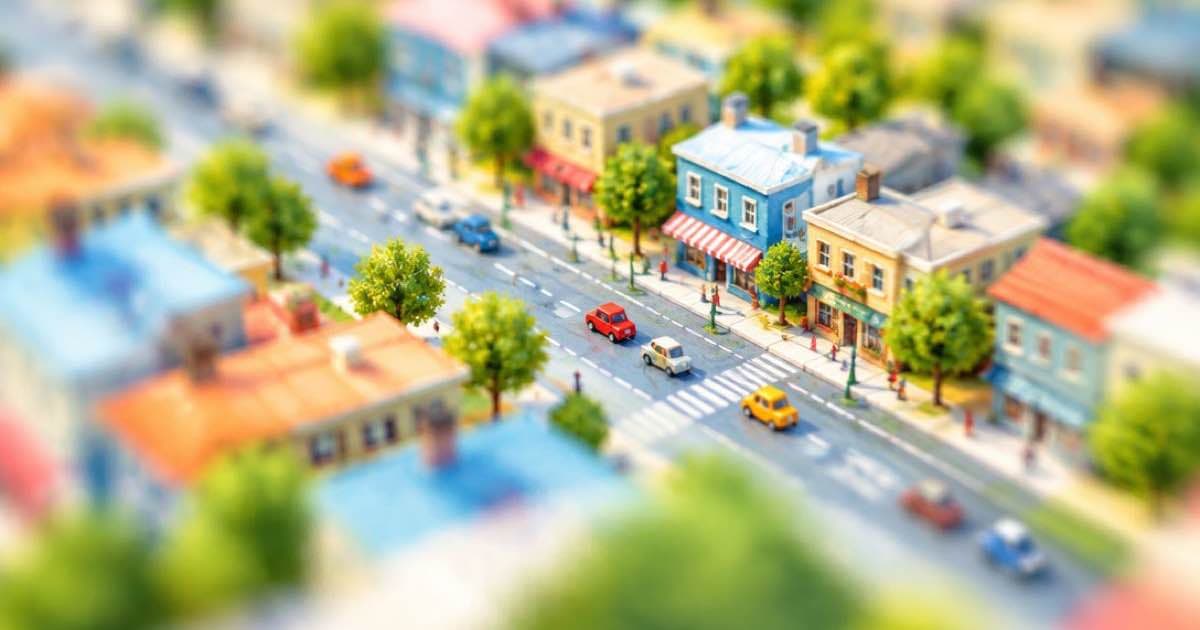
To give a photo the tilt-shift miniature look, you can either blur the top and bottom of the frame in code, which is free, or ask an edit model to rebuild the scene as a tiny model with shallow focus. On Sume, Nano Banana 2.1 (google/nano-banana-2.1) is the edit row to try, because its ratio list includes auto, so the result keeps the shape of the source photo; one 1K image costs $0.10.
Google's release notes say Nano Banana 2.1 shipped on 2026-10-06 as its image generation and conversational editing model (read 2026-10-11). Sume's row, price and limits come from the Image API page and the catalog code. A pure blur cannot change what the scene is, so the two approaches give different results, and the cheap path is to try the code first.
The free version: a gradient blur
The miniature effect comes from a narrow strip of sharpness across the frame with strong blur above and below, plus saturated colour and a slight contrast lift. A photo taken from a high angle works best, because the eye reads the blur as a very close lens. The script below builds a vertical gradient mask and blends a blurred copy through it.
from PIL import Image, ImageEnhance, ImageFilter

def tilt_shift(src, dst, focus=0.55, band=0.12, radius=14):
    img = Image.open(src).convert("RGB")
    w, h = img.size
    blurred = img.filter(ImageFilter.GaussianBlur(radius))
    mask = Image.new("L", (w, h))
    px = mask.load()
    for y in range(h):
        dist = max(0.0, abs(y / h - focus) - band) / (0.5 - band)
        value = int(255 * min(1.0, dist * 1.6))
        for x in range(w):
            px[x, y] = value
    out = Image.composite(blurred, img, mask)
    out = ImageEnhance.Color(out).enhance(1.35)
    out = ImageEnhance.Contrast(out).enhance(1.12)
    out.save(dst, "JPEG", quality=92)

tilt_shift("street.jpg", "street_mini.jpg")
The model version: rebuild it as a model
A model edit can do what the blur cannot: simplify cars into toy shapes, add a glossy paint sheen and tidy clutter. Send the photo as a reference with aspect_ratio: "auto" and one of the resolution tiers. The docs say that on edit calls auto matches the reference, and that leaving the field out is not the same as auto.
import os, requests

r = requests.post(
    "https://api.sume.com/v1/images",
    headers={"Authorization": f"Bearer {os.environ['SUME_API_KEY']}"},
    json={
        "model": "google/nano-banana-2.1",
        "prompt": "Make this look like a tilt-shift miniature model town: shallow depth of field, toy-like cars, saturated colour, keep the layout",
        "input_references": [
            {"type": "image_url", "image_url": {"url": "https://example.com/street.jpg"}}
        ],
        "aspect_ratio": "auto",
        "resolution": "1K",
        "n": 2,
    },
    timeout=60,
)
r.raise_for_status()
print(r.status_code, [i["url"] for i in r.json().get("data", [])] if r.status_code == 200 else "job")
What each route costs
Nano Banana 2.1 is priced by resolution tier. The first three rows below follow Sume's pricing code (list $0.08, $0.12 and $0.16 at 1K, 2K and 4K, with the 1.25 margin); the last row is the code route.
| Route | Price per image | Ten photos | Changes the scene? |
|---|---|---|---|
| Nano Banana 2.1 at 1K | $0.10 | $1.00 | Yes |
| Nano Banana 2.1 at 2K | $0.15 | $1.50 | Yes |
| Nano Banana 2.1 at 4K | $0.20 | $2.00 | Yes |
| Pillow gradient blur | $0.00 | $0.00 | No, blur and colour only |
A cheap order of operations
Run the Pillow version on every photo first and keep the ones that already look right. Send only the failures, usually flat or low-angle shots where blur alone reads as bad focus, to the model at 1K. If one comes back well, a 2K or 4K repeat of the same prompt costs $0.05 or $0.10 more per image. For example, four 1K tries plus one 4K final is 4 x $0.10 + $0.20 = $0.60.
Sume does not return a seed and does not accept one, so a 4K repeat will not be identical to the 1K draft; treat the draft as a check on the prompt, not a preview of the final pixels.
Choosing your source photo
The effect depends on the camera angle more than on the tool. Shoot or pick pictures taken from a balcony, bridge, rooftop or hillside, looking down at 30 to 60 degrees. Wide scenes with many small objects such as boats, cars, market stalls and sports pitches sell the illusion, because the viewer assumes tiny things must be models. Photos shot at eye level with a single large subject rarely work, with either code or a model, since there is no scale cue to fool.
Keep the sharp band across the part of the frame that holds the story, and move the focus value in the script to match. A band of 12 percent of the height on each side of the centre is a reasonable start; raise radius for a stronger effect and lower the saturation boost if skin tones turn orange.
Limits
Nano Banana 2.1 accepts up to 10 references and n up to 4 on Sume, far more than this edit needs. A call that outlasts the 30-second wait returns 202 with a job; the sample prints "job" in that case, and Jobs and results explains how to fetch the images. Failed generations are not billed.
Moving objects, crowds and legible signs are where model rebuilds drift: check people and text against the source before you publish.
Sources
Related posts
More in Use cases
- Voice actor or AI voice for a 30-second ad? What an API covers
Hire a voice actor or use AI text to speech for a 30-second ad: what Sume's TTS API does, what it cannot do, and the $0.315 audio bill for three takes.
- AI album cover generator: square art at 3000×3000
Generate square album art, then upscale: Apple recommends at least 3000×3000. On Sume, generate 2400×2400 and upscale it 1.25× to reach 3000×3000.
- AI avatar for online course videos: build and update lessons
Use an AI avatar as your online course instructor: one reusable avatar, a short talking video per section, captions, and one Timeline join per lesson.
- Talking avatar for PowerPoint presentations, slide by slide
Make a talking avatar presenter for PowerPoint: one Sume clip per slide, up to 60 seconds each, in 16:9 or 4:3 to match the slide, inserted as MP4.
Written by Sume