
Photo to linocut print: Ideogram 4.5 edit and a 2-color threshold
A linocut look from a photo: one Ideogram 4.5 edit from $0.0375, then a Pillow threshold that makes it truly two-colour. Low, medium, high compared on Sume.
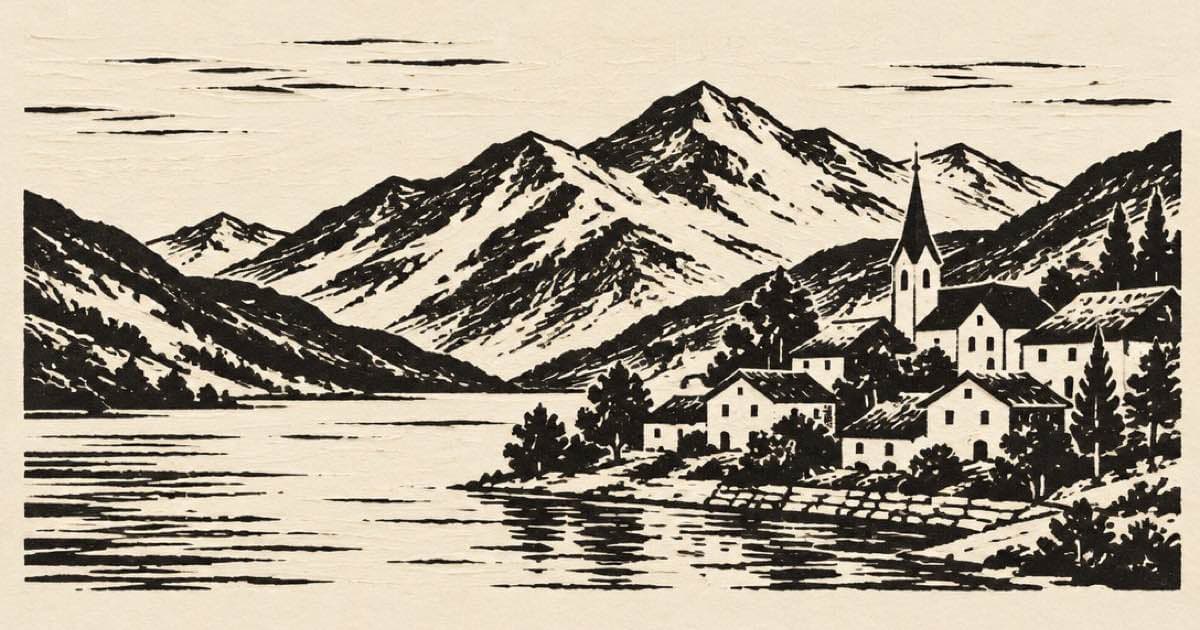
To make a linocut print from a photo, ask an edit model for bold black shapes with carved white highlights and no gradients, then force the result to two colours in code. On Sume, Ideogram 4.5 (ideogram/ideogram-v4.5) is a good first test because an edit without aspect_ratio keeps the shape of the source image, and its low tier lists at $0.0375 an image.
A model rarely returns pure black and white even when you ask for it, and a real linocut has exactly two inks. So the recipe has two steps: one paid edit, then a free threshold with Pillow. Prices and limits come from the Image API page and Sume's catalog code, read on 2026-10-11.
Step one: the edit
With Ideogram 4.5, the first reference is the image that gets edited and up to four more act as references, five in total. For a linocut you only need the photo. Choose quality from low, medium or high; if you omit it the default is medium. Choose resolution 1K or 2K; the price is the same for both.
Leave aspect_ratio out so the output keeps the photo's shape. Note that the output format is chosen by the provider, so the catalog row lists no output_format values; convert after download rather than asking for PNG.
import os, requests

r = requests.post(
    "https://api.sume.com/v1/images",
    headers={"Authorization": f"Bearer {os.environ['SUME_API_KEY']}"},
    json={
        "model": "ideogram/ideogram-v4.5",
        "prompt": "Convert to a linocut print: solid black ink shapes, white carved highlights, bold outlines, no grey gradients, keep the composition",
        "input_references": [
            {"type": "image_url", "image_url": {"url": "https://example.com/photo.jpg"}}
        ],
        "quality": "low",
        "resolution": "2K",
    },
    timeout=60,
)
r.raise_for_status()
body = r.json()
if r.status_code == 202:
    print("still running:", body["data"]["status_url"])
else:
    for img in body["data"]:
        print(img["url"])
What the three quality tiers cost
The quality tier is the only price lever on this row. The list rates below are the figures in the Image API page; the Sume price is list times 1.25.
| Quality | List price | Sume price per image | Four takes |
|---|---|---|---|
| low | $0.03 | $0.0375 | $0.15 |
| medium (default) | $0.06 | $0.075 | $0.30 |
| high | $0.22 | $0.275 | $1.10 |
Step two: make it two colours
Open the downloaded file, convert it to greyscale, and cut it at a level. Pick the cut by eye on a few values; 110 to 150 usually brackets the useful range. Saving as PNG avoids adding JPEG noise around the hard edges.
from PIL import Image

def linocut(src, dst, cut=128, ink=(20, 18, 16), paper=(244, 238, 226)):
    gray = Image.open(src).convert("L")
    mask = gray.point(lambda p: 255 if p >= cut else 0)
    out = Image.new("RGB", gray.size, ink)
    out.paste(Image.new("RGB", gray.size, paper), mask=mask)
    out.save(dst, "PNG")

for cut in (110, 128, 150):
    linocut("edit.png", f"linocut_{cut}.png", cut)
A cheap way to choose a tier
Run the same photo at low, medium and high once: $0.0375 + $0.075 + $0.275 = $0.3875. If the low tier already gives clean shapes after the threshold, you can run a whole set at low and spend about a seventh of the high price. Because the threshold throws away shading, the extra detail that high buys is often wasted on this look, but test it on your own photos rather than trusting that.
Making the carved look believable
A threshold decides where black ends and paper begins, so the edit should hand it clean tonal blocks. Three habits help. First, ask for a limited number of tones in the prompt ("three tones: black, mid grey, white"); the threshold then has an easy choice to make. Second, keep the subject large in the frame, because thin lines vanish when a cut value removes mid-greys. Third, ask for visible gouge marks in the highlights; those short parallel strokes are what separates a linocut from a plain high-contrast photo.
If the black areas swallow detail, raise the cut value rather than regenerating. If the paper areas speckle, lower it. The three-value loop above writes all three files in a second, which is cheaper than another paid take. Only re-run the edit when the shapes themselves are wrong, for example a face merged into the background.
For a set of prints that should feel like one series, reuse the exact same prompt and the same quality tier across the whole set, and fix the ink and paper colours in the script. The model changes the drawing from photo to photo; the code keeps the palette identical.
Ideogram 4.5 takes five references in total, so it will not take a style sheet of ten linocuts as guidance; use a text description of the style instead. POST /v1/images returns images in the same call for up to 30 seconds and otherwise answers 202 with a job; see Jobs and results. Failed generations are not billed.
Sources
Related posts
More in Use cases
- Photo to stained glass window: one Seedream 4.5 edit
Turn a photo into a stained glass window with one reference edit: Seedream 4.5 at $0.05 an image, an explicit ratio, and four takes for $0.20 on Sume.
- Tilt-shift miniature effect: Nano Banana 2.1 edit or Pillow blur
Make a photo look like a tiny model town: a Nano Banana 2.1 edit with auto ratio from $0.10 on Sume, or a free Pillow gradient blur. Both compared.
- Voice actor or AI voice for a 30-second ad? What an API covers
Hire a voice actor or use AI text to speech for a 30-second ad: what Sume's TTS API does, what it cannot do, and the $0.315 audio bill for three takes.
- AI album cover generator: square art at 3000×3000
Generate square album art, then upscale: Apple recommends at least 3000×3000. On Sume, generate 2400×2400 and upscale it 1.25× to reach 3000×3000.
Written by Sume