
Layered paper-cut art from a photo: FLUX.2 flex or pro on Sume
Photo to layered paper-cut art with a reference edit: FLUX.2 flex at $0.0625 or pro at $0.0375 on Sume, four takes for $0.25 or $0.15.
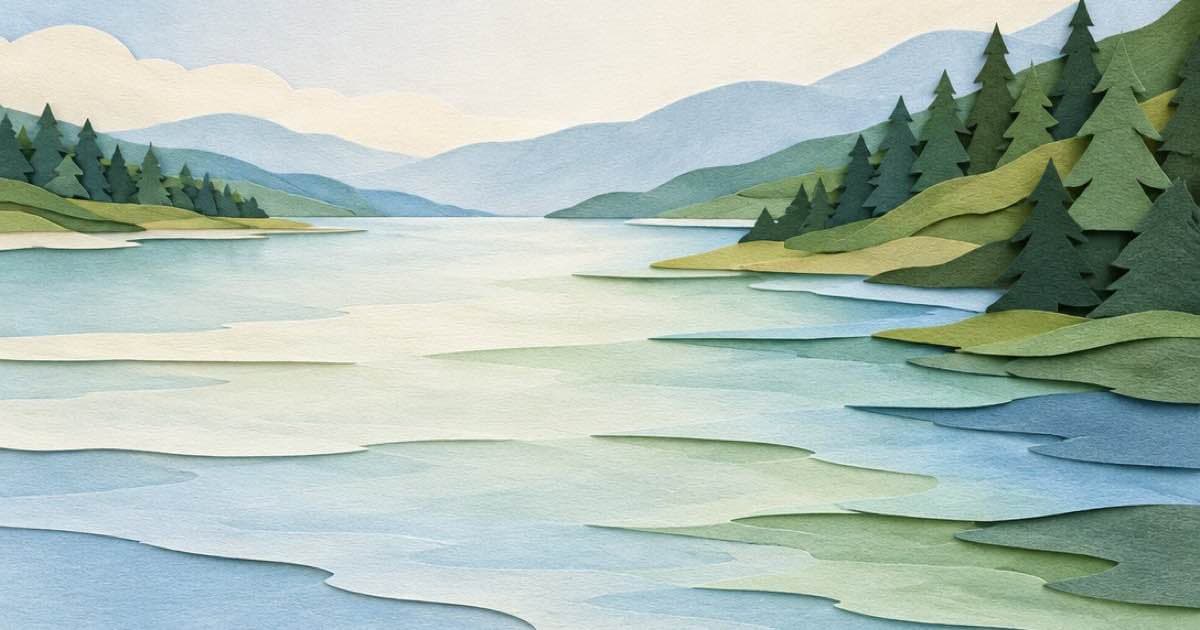
For layered paper-cut art from a photo, send the photo to a FLUX.2 edit row on Sume and describe stacked sheets of coloured paper with soft shadows between the layers. Sume lists two FLUX.2 rows: black-forest-labs/flux.2-pro at $0.0375 an image and black-forest-labs/flux.2-flex at $0.0625, so four takes cost $0.15 or $0.25.
Black Forest Labs describes FLUX.2 [flex] as specialized for typography and fine detail preservation and FLUX.2 [pro] as high-quality output at competitive pricing; its page also lists [max] and [klein] (read 2026-10-11 on bfl.ai). Sume's catalog, read the same day from the Image API page and the catalog code, has only pro and flex, so max and klein are not available there.
Why flex is the one to test
Paper-cut art lives on thin edges: a narrow gap between two sheets, a small cut-out window, scalloped borders. Those are fine details, which is what BFL says flex is built to keep. That is a vendor description, not a measured result on your photos, so the plan is to run the same photo and prompt on both rows and compare edges at full size.
Both rows take up to 10 references and n up to 4. Neither lists auto for aspect_ratio, so pass the photo's ratio. The flux rows share the list 1:1, 16:9, 9:16, 4:3, 3:4, 4:5, 5:4, 3:2, 2:3, 21:9, 9:21, 1:2 and 2:1.
The request
The prompt should name the layer structure and the shadow, because shadow is what turns flat colour into depth. Count the layers you want: five to seven reads as paper craft, twenty reads as noise.
import os, requests

r = requests.post(
    "https://api.sume.com/v1/images",
    headers={"Authorization": f"Bearer {os.environ['SUME_API_KEY']}"},
    json={
        "model": "black-forest-labs/flux.2-flex",
        "prompt": "Layered paper-cut art of this scene: six stacked sheets of coloured paper, clean cut edges, soft drop shadows between layers, keep the composition",
        "input_references": [
            {"type": "image_url", "image_url": {"url": "https://example.com/lake.jpg"}}
        ],
        "aspect_ratio": "3:2",
        "n": 4,
    },
    timeout=90,
)
r.raise_for_status()
body = r.json()
print([i["url"] for i in body["data"]] if r.status_code == 200 else body["data"]["status_url"])
Cost comparison
The two rows differ by $0.025 per image. For a four-take test the gap is $0.10, and over a set of 100 photos at one take each it is $2.50.
| Sume model id | Price per image | Four takes | 100 photos, one take |
|---|---|---|---|
| black-forest-labs/flux.2-pro | $0.0375 | $0.15 | $3.75 |
| black-forest-labs/flux.2-flex | $0.0625 | $0.25 | $6.25 |
Prompt habits for paper craft
These are prompting habits to test, not Sume parameters:
- Name the paper: "matte cardstock in five blues and one orange" keeps the palette tight.
- Name the shadow: "soft shadow under every layer" is the depth cue; without it the layers merge.
- Ask for the frame: a shadow-box edge or a plain border gives the piece a clear boundary.
- Avoid fine hair and text; paper cannot do either, and the model will fake both badly.
- Run the same prompt on
n: 4and pick, since layers vary a lot from take to take.
Printing and cutting it for real
If you want a physical piece, treat the output as a design reference. Count the layers in the result, trace each colour region, and cut the shapes from real card using a craft knife or a cutting machine. Models often fuse two layers into one or add a gradient that paper cannot produce, so ask for flat colour per sheet and check each region before you cut. A shadow-box frame two or three centimetres deep gives the shadows between the sheets somewhere to fall.
For a digital use such as a banner, poster or social cover, take the best of the four takes and upscale or crop it in your own tools. Pick the ratio from the destination first, for example 4:5 for a feed post or 16:9 for a header, because the flux rows need an explicit ratio.
Limits
FLUX.2 on Sume is stateless, so a second pass ("make the top layer a warmer red") sends the first result back as a reference and bills another generation. A response beyond the 30-second wait arrives as a 202 job (see Jobs and results). Failed generations are not charged. If your photo contains a person, check that the face survives the simplification before you print.
Sources
Related posts
More in Use cases
- Logo in the first 2 seconds plus an end card: Pinterest and Amazon
Pinterest wants the logo in the first 1-2 seconds; Amazon says beginning or end. Build both cuts from one clip with Timeline 1.0 for $0.10 each.
- Photo to halftone pop art: a $0.025 Qwen edit plus Pillow dots
Make a pop-art halftone from a photo: a flat-colour Qwen Image edit at $0.025 on Sume, then a short Pillow script that draws the dot grid in code.
- Photo to linocut print: Ideogram 4.5 edit and a 2-color threshold
A linocut look from a photo: one Ideogram 4.5 edit from $0.0375, then a Pillow threshold that makes it truly two-colour. Low, medium, high compared on Sume.
- Photo to stained glass window: one Seedream 4.5 edit
Turn a photo into a stained glass window with one reference edit: Seedream 4.5 at $0.05 an image, an explicit ratio, and four takes for $0.20 on Sume.
Written by Sume