
Nine stickers in one render: a 3x3 transparent sheet, sliced
Ask ChatGPT Image 2.5 for a 1:1 sheet of nine stickers on a transparent background, cut it into nine PNGs, and flag any sticker that crosses a cell edge.
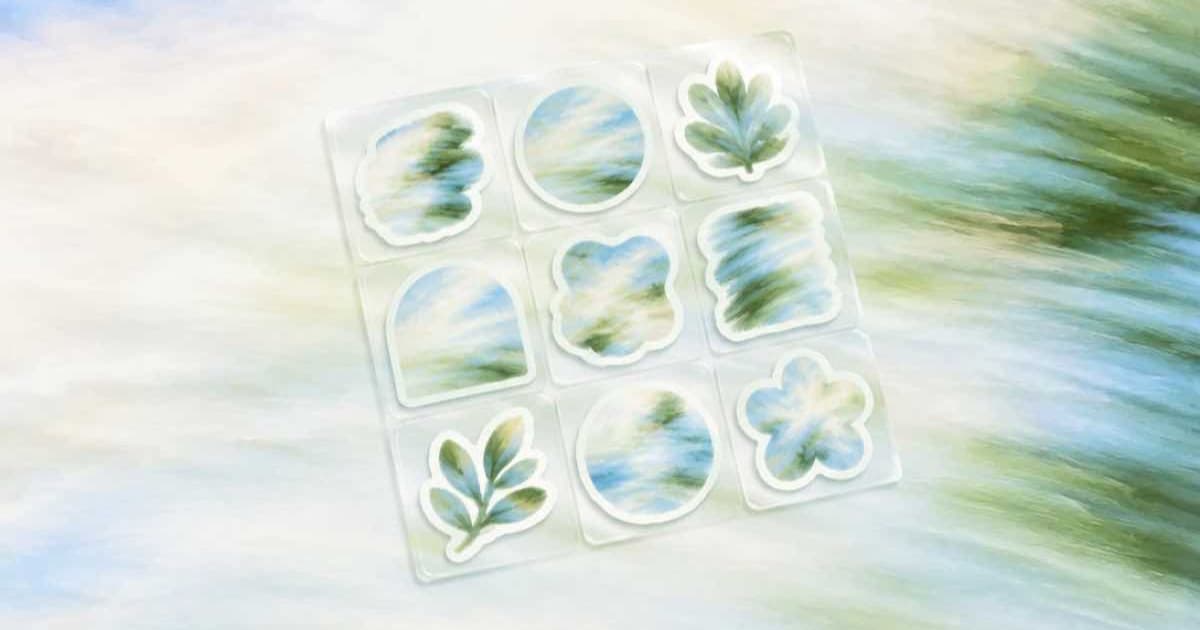
To get nine stickers from one render, ask openai/gpt-image-2.5 for a 1:1 sheet laid out as a 3x3 grid with background: "transparent" and output_format: "png", then cut the PNG into nine equal cells with Pillow. Check each cell's edge pixels for alpha: a sticker touching the cell border crossed the grid line and should be regenerated. One render replaces nine requests.
Why one sheet and not nine requests?
A sheet keeps the style consistent: the same line weight, palette and outline thickness across all nine. It is also one request to retry. OpenAI's image generation guide says transparency needs background: "transparent" with a png or webp output, and Sume's Image API docs list background for ChatGPT Image 2.5 only.
Square is the safest shape. 1:1 is on the row's ratio list, and equal cells divide a square exactly.
What belongs in the prompt?
Say the grid out loud: "a 3x3 sheet of nine die-cut stickers, one subject per cell, thick white outline, wide empty margins between stickers, nothing touching the edge of the image, transparent background." Name the nine subjects in reading order. Wide margins are what make equal-cell slicing safe.
| Field | Value |
|---|---|
model | openai/gpt-image-2.5 |
aspect_ratio | 1:1 |
background | transparent |
output_format | png |
quality | medium, not auto (Sume reserves max for auto) |
How big can each sticker be?
At the 1:1 default each cell is a third of the sheet, so a 1024-pixel sheet gives cells of about 341 pixels. For print, send image_size as custom pixels instead of aspect_ratio: Sume's docs give the GPT limits as multiples of 16, a longest edge of 3840, and 655,360 to 8,294,400 total pixels. The largest square that fits is 2880 by 2880, which is exactly 8,294,400, so each cell is 960 pixels. image_size wins over aspect_ratio, so send only one of them. If you omit quality, Sume's docs say the default is high; set medium yourself to keep a trial cheap.
How do I slice the sheet?
The script cuts nine cells, trims each to its visible pixels with getbbox, and prints a warning when a cell's edge has any non-transparent pixel.
Before you cut, open the sheet on a checkerboard or a dark background. A faint white halo around a sticker means the model drew an outline into the artwork, which is usually what you want for stickers, but a gray fringe means leftover background and is a reason to rerun. Check this on the sheet once rather than on nine files, because a bad sheet costs one call and nine bad crops cost nothing extra to find, but you will have wasted the slicing step.
from PIL import Image

sheet = Image.open("sheet.png").convert("RGBA")
cell_w, cell_h = sheet.width // 3, sheet.height // 3

for row in range(3):
    for col in range(3):
        box = (col * cell_w, row * cell_h,
               (col + 1) * cell_w, (row + 1) * cell_h)
        cell = sheet.crop(box)
        alpha = cell.getchannel("A")
        tight = alpha.getbbox()
        if tight is None:
            print(row, col, "empty cell")
            continue
        if tight[0] == 0 or tight[1] == 0 or \
           tight[2] == cell_w or tight[3] == cell_h:
            print(row, col, "touches the cell edge")
        cell.crop(tight).save(f"sticker_{row}{col}.png")
What if the render comes back as a 202?
Higher qualities can pass the 30-second wait, and Sume then returns a job envelope instead of the picture. Fetch the PNG from the job result as described in Jobs and results.
Sources
Related posts
More in Use cases
- Photo to cyanotype print: Qwen Image edit or a Pillow colorize?
A cyanotype look is two tones, so Pillow can do it free. Use qwen/qwen-image at $0.025 only when you want paper texture and brushed edges. Both steps here.
- Photo to felt and knitted looks: three Grok Imagine calls, 7.5 cents
Grok Imagine on Sume returns one image per call and costs $0.025, so three craft looks of one photo are three requests and $0.075. One short script runs them.
- Photo to halftone pop art: a $0.025 Qwen edit plus Pillow dots
Make a pop-art halftone from a photo: a flat-colour Qwen Image edit at $0.025 on Sume, then a short Pillow script that draws the dot grid in code.
- Photo to line drawing on a transparent background with GPT Image 2.5
Turn one photo into black line art with a real alpha channel: ChatGPT Image 2.5 edit, background transparent, PNG, and a Pillow check before you trust it.
Written by Sume