
Photo to felt and knitted looks: three Grok Imagine calls, 7.5 cents
Grok Imagine on Sume returns one image per call and costs $0.025, so three craft looks of one photo are three requests and $0.075. One short script runs them.
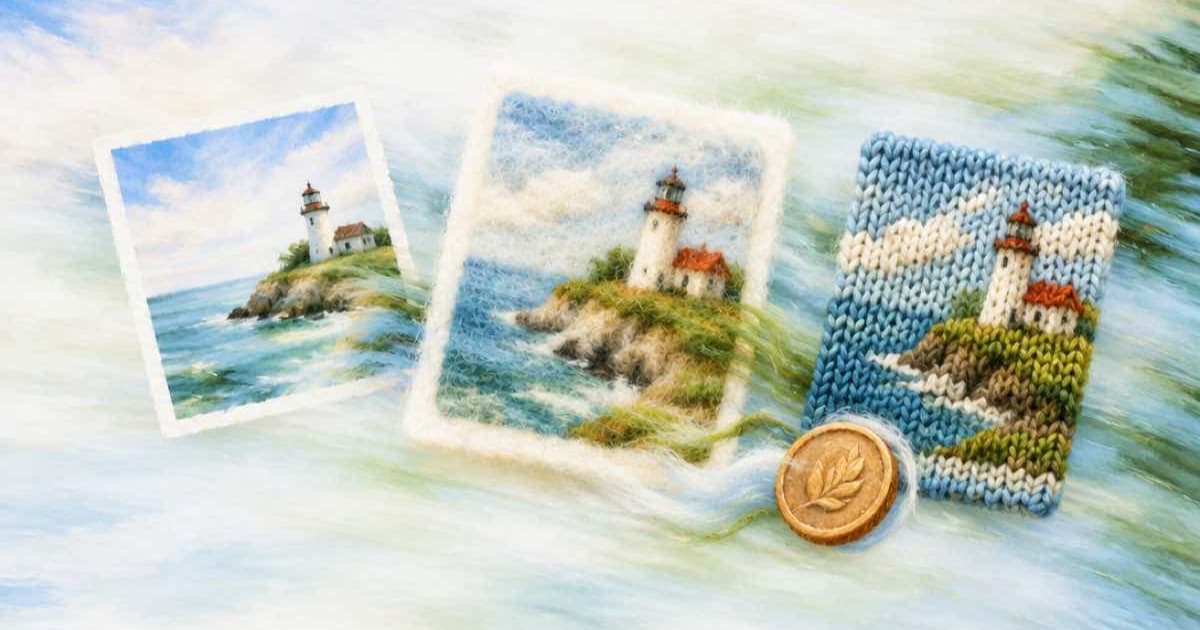
To see one photo as felt, knitted wool and needle-felted fiber, send three requests to x-ai/grok-image, each with the photo as an input_references entry and a different craft in the prompt. Sume's catalog lists this row at $0.025 per image and caps it at one image per call, so the three looks are three calls and $0.075 in total, with no way to batch them into n: 3.
Why three calls and not n=3?
The n range for Grok Imagine on Sume is 1 to 1. Most other rows take 1 to 4. A request for more than the row's ceiling comes back as a 400, so the loop is the supported route. Sume also rejects any field the row does not list, so keep the body to model, prompt, input_references and aspect_ratio.
Grok's ratio list is the longest on the platform: 2:1, 20:9, 19.5:9, 16:9, 4:3, 3:2, 1:1, 2:3, 3:4, 9:16, 9:19.5, 9:20 and 1:2. It has no 4:5 and no auto, so crop a 3:4 result if you need an Instagram portrait.
What does the script look like?
Each craft gets its own prompt. The loop stops on the first non-200 response, because a 202 means a job envelope and needs the job result instead.
import os
import requests

PHOTO = "https://example.com/photo.jpg"
CRAFTS = {
    "felt": "flat wool felt appliqué, stitched edges, visible fibers",
    "knit": "hand-knitted wool, chunky stitches, soft yarn texture",
    "needle": "needle-felted miniature, fuzzy fibers, studio light",
}
head = {"Authorization": f"Bearer {os.environ['SUME_API_KEY']}"}

for name, look in CRAFTS.items():
    body = {
        "model": "x-ai/grok-image",
        "prompt": f"This photo remade as {look}",
        "input_references": [{"type": "image_url",
                              "image_url": {"url": PHOTO}}],
        "aspect_ratio": "3:4",
    }
    r = requests.post("https://api.sume.com/v1/images",
                      headers=head, json=body, timeout=60)
    if r.status_code != 200:
        raise SystemExit(f"{name}: {r.status_code} {r.text[:150]}")
    print(name, r.json()["data"][0]["url"])
How do I pick the ratio for a landscape photo?
The row has no auto, so choose the closest value from its list yourself: 3:4 for a portrait photo, 4:3 or 3:2 for landscape, 1:1 for a square crop. Divide width by height, compare against the list, and take the nearest. Sume returns Sume-hosted signed URLs rather than inline image data, so download each file in the same script instead of storing the link for later.
What does the set cost?
Sume bills a completed generation in full and does not bill a failed or cancelled one, according to its docs. Endpoint pricing lines already include the Sume margin, so the cost is the row's cost_usd times the image count.
Run the three looks as three separate calls with the same photo and a different one-line material prompt, felt, knitted wool and embroidered patch. At $0.025 each, the set is $0.075, so you can keep all three and decide by eye. Because n is capped at 1 on this row, there is no cheaper batch option; the loop is the batch.
| Looks | Calls | Images | Cost |
|---|---|---|---|
| 3 | 3 | 3 | $0.075 |
| 6 | 6 | 6 | $0.15 |
| 12 | 12 | 12 | $0.30 |
Which look should I trust first?
Run the flat felt appliqué first. It has the simplest geometry, so a good result there tells you the portrait ratio and the reference are fine before you spend on the fuzzier looks. If a call times out at 30 seconds, the 202 path is described in Jobs and results.
Sources
Related posts
More in Use cases
- Photo to halftone pop art: a $0.025 Qwen edit plus Pillow dots
Make a pop-art halftone from a photo: a flat-colour Qwen Image edit at $0.025 on Sume, then a short Pillow script that draws the dot grid in code.
- Photo to line drawing on a transparent background with GPT Image 2.5
Turn one photo into black line art with a real alpha channel: ChatGPT Image 2.5 edit, background transparent, PNG, and a Pillow check before you trust it.
- Photo to linocut print: Ideogram 4.5 edit and a 2-color threshold
A linocut look from a photo: one Ideogram 4.5 edit from $0.0375, then a Pillow threshold that makes it truly two-colour. Low, medium, high compared on Sume.
- Photo to oil painting with a style reference: Ideogram 4.5 edit
Send your photo first and a painting second to ideogram/ideogram-v4.5: image one is edited, up to 4 more guide style. Low, medium, high cost 3.75 to 27.5 cents.
Written by Sume