
Lamp product photos, lit and unlit, from one reference
A lamp needs an off photo and an on photo. Use one reference and two Sume image calls with matched prompts, then check that the shade and base stay identical.
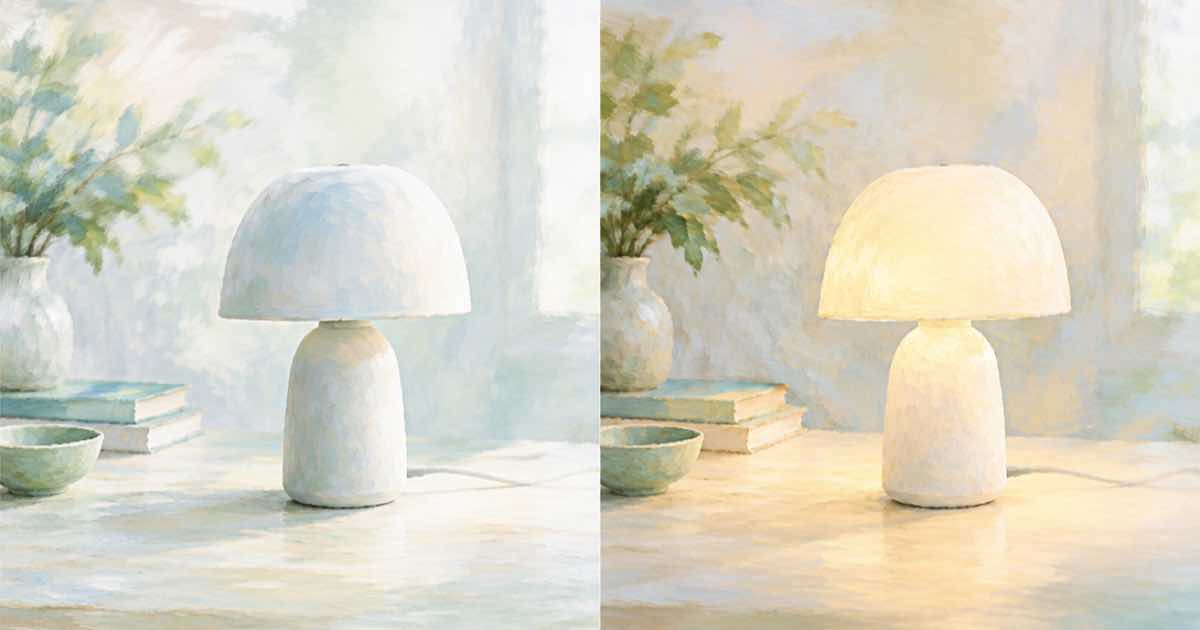
A product page for a lamp needs two states. Off shows the shape in daylight. On shows the glow in an evening room. Shooting both takes a studio and a dark room; generating both takes one reference and two matched prompts.
With Sume's Image API the reference is the lamp, and the pair differs in one line of the prompt.
Two prompts, one difference
Write the scene once and change only the lighting sentence. Matching everything else makes it easier to line up the pair on the page.
import os, requests

H = {"Authorization": f"Bearer {os.environ['SUME_API_KEY']}"}
SCENE = "Place this exact table lamp on a bedside table next to a book. Keep the shade, stem and base as in the reference."
STATES = {"off": "Daylight from a window, the lamp is switched off.",
          "on": "Evening, the lamp is switched on with a warm glow, the room is dim."}
for name, light in STATES.items():
    r = requests.post("https://api.sume.com/v1/images", headers=H, timeout=90, json={
        "model": "openai/gpt-image-2.5",
        "prompt": f"{SCENE} {light}",
        "input_references": [{"type": "image_url",
            "image_url": {"url": "https://example.com/lamp.jpg"}}],
        "aspect_ratio": "auto",
    })
    r.raise_for_status()
    print(name, r.json()["data"][0]["url"])
What to compare
- Shade shape, material and colour are the same in both images.
- The unlit lamp shows no glow; the lit lamp shows light through the shade, not a glowing base.
- Cord and switch are in the same place in both.
- Room lighting in the lit image looks plausible, with the shade as the brightest object.
Keep the real studio photo as the first image on the page. The generated pair shows the mood, and the original shows the product. Log usage.cost per call so the two states have a known price.
Before you run a catalog
Run one SKU end to end first. POST /v1/images returns the images directly when it finishes within 30 seconds; past that it returns a 202 envelope with status_url and result_url, which the jobs and results guide explains. Handle that branch before you loop over a catalog, and write each result's URL and usage.cost to a file keyed by SKU, so a failed run restarts where it stopped and nothing is paid for twice.
Sources
Related posts
More in Use cases
- LinkedIn Life tab images: 1128x376 main, 900x600 photos
LinkedIn Life tab sizes: main image 1128x376, custom modules 502x282, company photos 900x600 recommended. Request each from Sume at a legal size, then fit.
- LinkedIn newsletter logo 300x300 and cover 1920x1080
LinkedIn recommends a 300x300 newsletter logo and a 1920x1080 cover per article. 1080 is not a multiple of 16, so ask Sume for 1920x1088 and trim 4 px.
- LinkedIn Page cover 1512x256 and logo 400x400, 3 MB cap
LinkedIn Page covers are 1512x256 and logos 400x400 recommended, PNG or JPEG under 3MB. Crop a Sume 1536x512 image to 1512x256 with the exact box.
- LinkedIn Page link post image: 1200x627, over 200 px wide
For a LinkedIn Page post with a URL, use a 1.91:1 image at 1200x627 and more than 200 px wide, or it shows as a left thumbnail. Request 1280x672 from Sume.
Written by Sume