
Child's drawing to a picture-book page with GPT Image 2.5
Turn a child's drawing into a polished picture-book page: host the scan at a public HTTPS URL, pass it as a reference, and ask for 4:3. Code and Sume prices.
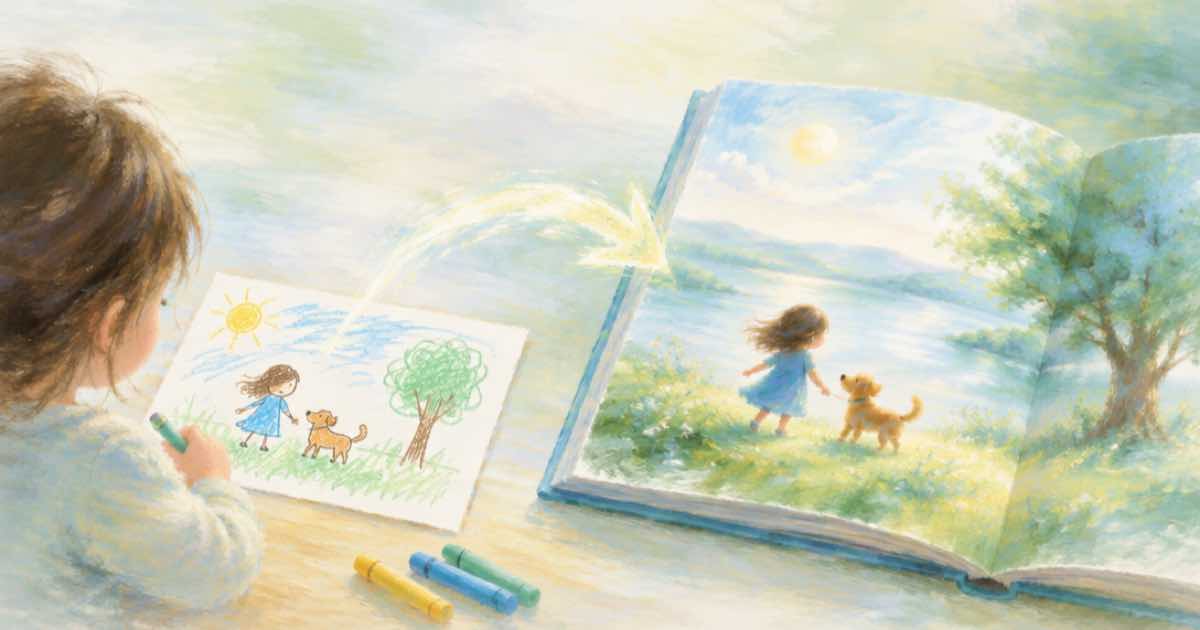
To turn a child's drawing into a picture-book page, upload the scan to a public HTTPS URL, send it as one input_references entry to GPT Image 2.5, and ask for a 4:3 page in your prompt and aspect_ratio. Say what to keep: the creature's odd proportions, the colors, the crooked smile.
The common failure is over-polish. If the prompt says only "make it professional", the model smooths away the thing that made the drawing special. Name the features to preserve.
Write the prompt as keep and change lists
Split the prompt in two. Keep: the big round head, the three legs, the orange and purple palette, the wobbly line. Change: add a soft watercolor paper texture, a simple meadow background and room at the top for text. Then state that the picture must stay recognisable to the child who drew it.
Phone scans are the usual input. Crop the page edge and flatten shadows first, and use a JPEG or PNG. Sume only reads references from public HTTPS URLs, so a private link or a local path fails with 400 input_media_unreachable.
| Setting | Value | Note |
|---|---|---|
| aspect_ratio | 4:3 | Landscape spread page |
| input_references | 1 public HTTPS URL | The scan of the drawing |
| quality | medium to high | Medium for drafts |
| output_format | png | Lossless page for layout |
| n | 1 | Compare pages one at a time |
Request
Reference URLs must be public HTTPS, and Sume answers 400 input_media_unreachable when it cannot download one. A file on your laptop needs a public upload first, for example through the assets upload flow.
import os, requests
H = {"Authorization": f"Bearer {os.environ['SUME_API_KEY']}"}

def generate(body):
    r = requests.post("https://api.sume.com/v1/images", headers=H, json=body, timeout=60)
    if r.status_code != 200:  # 202 = still running, read data.status_url
        raise SystemExit(f"{r.status_code}: {r.text[:300]}")
    return r.json()["data"][0]["url"]
from io import BytesIO
from PIL import Image

url = generate({
    "model": "openai/gpt-image-2.5",
    "prompt": "Make a picture-book page from this child's drawing. Keep the big round head, three legs, orange and purple colors and the wobbly line. Add watercolor paper texture and a simple meadow, with empty space at the top for text.",
    "input_references": [{"type": "image_url", "image_url": {"url": "https://example.com/drawing-scan.jpg"}}],
    "aspect_ratio": "4:3",
    "quality": "medium",
    "output_format": "png",
})
Image.open(BytesIO(requests.get(url, timeout=60).content)).save("page-1.png")
print("saved page-1.png")
Cost per page
GPT Image 2.5 is billed on tokens. The fal pages list $30 per million output image tokens, $8 per million image input tokens and $5 per million text input tokens. Sume bills the provider list price times 1.25. The table is output-only, so reference and prompt tokens add a little on top of it.
A 4:3 page at a 1024x768 size is a useful draft. The table prices that size.
| Quality | Provider list | Sume at list x 1.25 |
|---|---|---|
| low | $0.004 | $0.005 |
| medium | $0.009 | $0.0113 |
| high | $0.0361 | $0.0451 |
Keep the character across pages
For page two, pass the original drawing and the approved page one as two references, and name which image holds the character. See the storybook post for the consistency workflow.
If the call returns 202
POST /v1/images waits up to 30 seconds and returns 200 with the images. A slow job falls back to a 202 job envelope, and you read the images from GET /v1/jobs/{id}/result. The code above exits on any non-200 so you notice, and a failed synchronous job returns 502 and is not billed.
Ask the child, then check the page
The goal is a page the child still recognises as theirs. A short check against the original catches the common drift before you build a whole book.
- Read the page next to the original: is every feature you listed still there?
- If the style drifted, shorten the prompt and name one art style only.
- Save a PNG of each approved page so the next page can reference it.
Sources
Related posts
More in Use cases
- Choking hazard warning in a holiday toy ad: match the product label
CPSC says internet ads for toys that need a choking-hazard label must use the same warning (16 CFR 1500.20). Burn the label text as a cue and assert it matches.
- Christmas shipping cutoff videos: put the last order date in input
A last-order-date promo is wrong the day the date moves. Keep the cutoff in each bulk item's input, derive it from one config, and re-run only what changed.
- Coffee ad in one take, pour to sip: Seedance 2.5 prompt and price
A 20-second one-take coffee ad on Seedance 2.5: pour, steam, hand, sip. Prompt wording, why one take suits liquids, and the Sume price at 720p and 1080p.
- Country and acoustic folk music for a brand ad: a warm brief
Brief an instrumental country-folk bed for a brand ad on Sume: guitars, pace, and a warm ending. A take is $0.125; a 30-second ad renders at $0.10.
Written by Sume