
Boutique dress try-on video from one garment photo on Sume
A small boutique can preview one dress on a person in a vertical video with the sume-virtual-try-on Format. What to send, what it is not, and the spend cap.
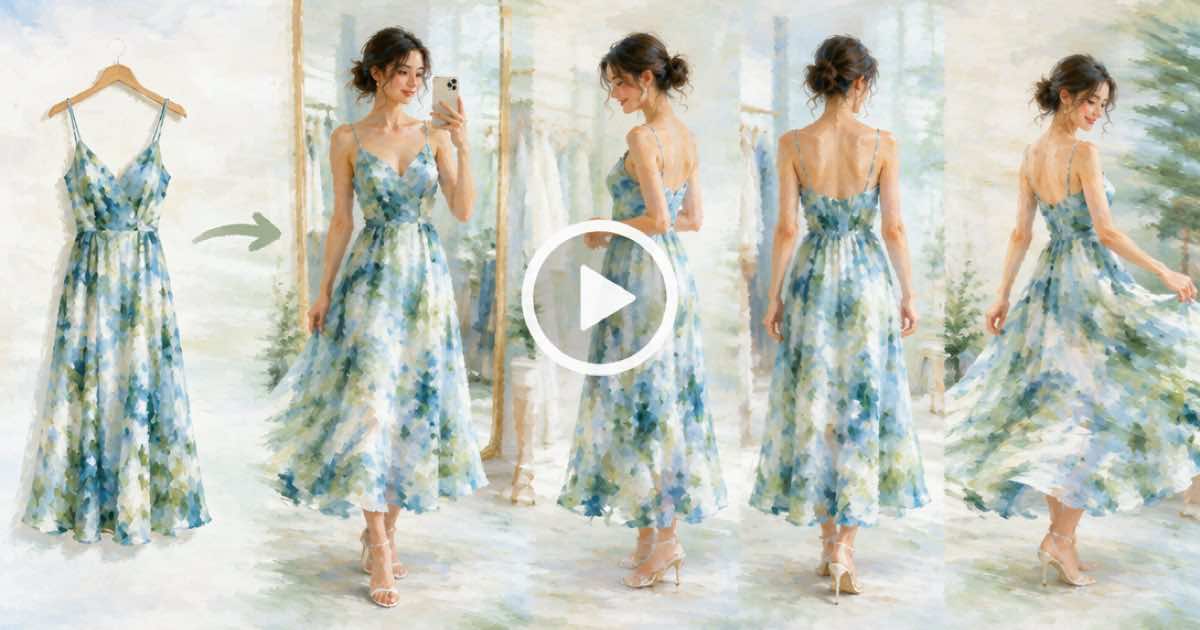
A boutique can make a try-on video by calling the catalog Format sume-virtual-try-on with a garment photo and a person photo. Sume describes it as making a vertical video of a person wearing a supplied garment, true to its fit and construction, for try-ons, outfit previews and fitting videos for apparel.
It is a preview tool for a store that cannot shoot every new arrival. It is not a size guide, and the video should never be the only thing a customer sees about fit.
Pick the right Format
Sume has two nearby Formats. sume-virtual-try-on is for a person wearing a supplied garment in a vertical video. sume-virtual-fitting focuses on garment fit, silhouette and movement on a supplied person, for ecommerce fitting previews and product-page videos. Not for: a still lookbook or a garment-only product shot, per the Format description for try-on.
A boutique that wants a social preview of a new dress picks try-on. A shop that wants a product-page clip about how the cut moves picks fitting. Read both with GET /v1/formats/sume/{slug} to see the io profile before you decide.
| Format | What it makes | Use for |
|---|---|---|
| sume-virtual-try-on | Vertical video of a person wearing a supplied garment | Try-ons, outfit previews |
| sume-virtual-fitting | Fit, silhouette and movement on a supplied person | Ecommerce fitting previews, product-page video |
| sume-fashion-editorial | High-fashion editorial video | Campaign or lookbook mood |
| sume-editorial-product-set | Coordinated collection still | Bundles and gift sets |
The inputs and the consent rule
Attach up to 30 images on a Format run. For a try-on, that is the garment photo on a flat surface or hanger, and a photo of the person who will appear in the video. Use a staff member or model who has agreed in writing. Do not put a customer or an influencer into a video without permission.
Send a clear garment photo: the whole item, even light, front view. A photo with a busy background or a folded sleeve gives the Format less to be true to.
curl -sS -X POST "https://api.sume.com/v1/formats/sume/sume-virtual-try-on/runs" \
  -H "Authorization: Bearer $SUME_API_KEY" \
  -H "Content-Type: application/json" \
  -H "Idempotency-Key: dress-0142-tryon-v1" \
  -d '{
    "instruction": "Vertical 9:16. Show the dress on the model, a slow turn, then a close look at the neckline.",
    "attachments": [
      { "type": "input_image", "image_url": "https://example.com/dress-flat.jpg" },
      { "type": "input_image", "image_url": "https://example.com/model.jpg" }
    ],
    "generation_spend_cap_usd": 10
  }'
Check the output like a returns department
Pause on the hem, the sleeves, any print and any hardware. A generated try-on can drift at those details. If the video shows a length or fit the dress does not have, do not post it. Customers who buy against a video that misrepresents the item send it back.
Keep real photos and a size chart next to the video on the listing.
Many dresses at once
For a whole new collection, the same Format can run in a bulk queue of up to 100 items, with your concurrency setting. Set a generation_spend_cap_usd per run and review every output before it goes live.
Sources
Related posts
More in Use cases
- Caption a 55-second ad in five languages: five jobs at $0.20 is $1.00
Sume captions cost $0.20 per job for video of 60 seconds or less, so one 55-second ad in five languages is five jobs and $1.00. Sume does not translate.
- Car detailing before-after clip: first and last frame on Seedance 2
Use a dirty-car photo as the first frame and a finished-car photo as the last frame in one Seedance 2 job on Sume. Limits, request body, and what to check.
- Change one of three identical bottles: position words or a mask
Edit one of three identical products in a photo. Flux 3 Image gives each element an id; on Sume, use position words (Ideogram 4.5) or a GPT Image 2.5 mask.
- Change prices on a chalkboard menu photo with Ideogram 4.5
Update dish prices on a chalkboard menu photo with ideogram/ideogram-v4.5: list old and new text, one change set per call, check each digit. $0.075 at medium.
Written by Sume