
AI bingo cards: 24 pictures once, unique cards shuffled in code
Generate 24 picture squares with the image API one time, then produce as many unique bingo cards as you need by shuffling in Pillow. Code and a cost check.
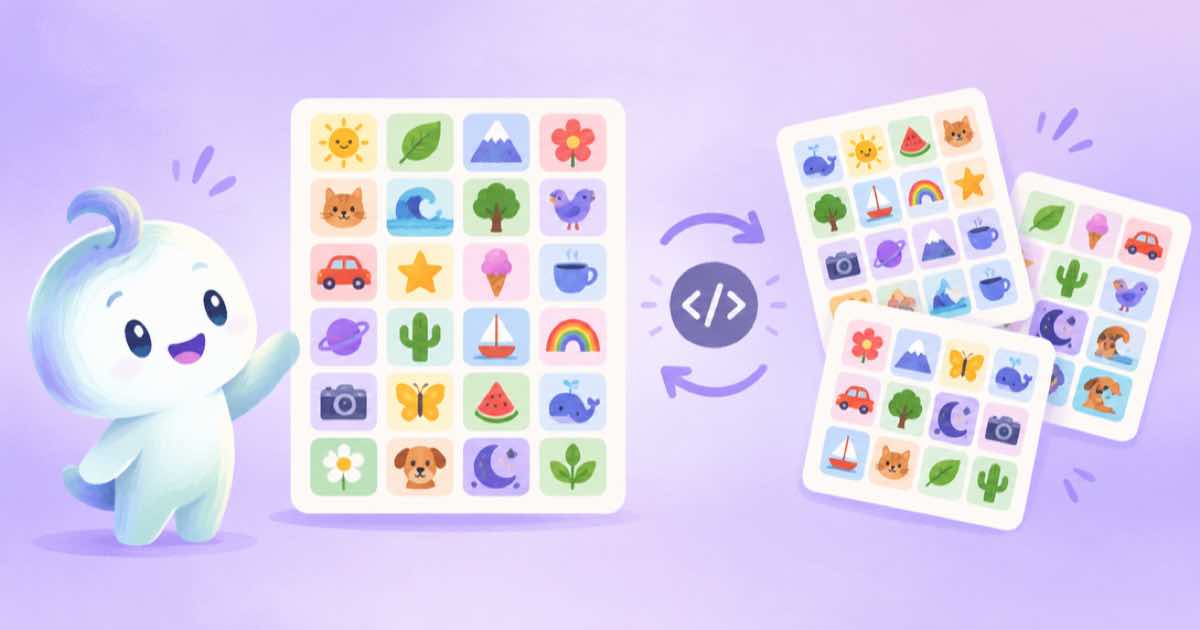
A picture-bingo night needs many different cards, but not many different images. Generate 24 picture squares once, add a free centre, and let code shuffle them into as many unique 5 by 5 cards as you want. Image generation is a one-time cost for the 24 squares; the extra cards cost nothing.
The design question is the picture set, not the cards: 24 subjects that look different from each other at small size, in one style. Generate them with one style block and a changing subject, and keep the first approved image as a reference so the set holds together.
Generate the 24 squares
Use square 1:1 images at a modest quality, because each square prints small. A single call returns up to four images (n is 1 to 4 for GPT Image 2.5), so six calls give you 24 squares if you ask for four related subjects per prompt, or use one call per subject for tighter control (Sume Image API docs).
Check what a run will cost before you start: each response carries usage.cost, and the endpoints call lists the per-image price. Multiply by 24, then by your retry rate, and decide whether quality: "low" is enough.
import os, requests

H = {"Authorization": f"Bearer {os.environ['SUME_API_KEY']}"}
STYLE = "flat sticker-style icon, thick outline, bright colors, plain white background, no text"
subjects = ["a rubber duck", "a teapot", "a paper plane", "a cactus"]
spent = 0.0
for s in subjects:
    r = requests.post("https://api.sume.com/v1/images", headers=H, timeout=120, json={
        "model": "openai/gpt-image-2.5", "prompt": f"{s}. {STYLE}",
        "aspect_ratio": "1:1", "quality": "low"})
    r.raise_for_status()
    if r.status_code == 202:
        print("queued:", s)
        continue
    spent += r.json()["usage"]["cost"]
    print(s, r.json()["data"][0]["url"])
print(f"spent so far: ${spent:.4f}; per square about ${spent / len(subjects):.4f}")
Unique cards from one set
Each card takes 24 of the squares in a random order, with a free space in the centre. With 24 squares there are 24 factorial possible orderings, far more cards than a party needs, but check that no two cards repeat by seeding each card with its number.
The code builds N cards from the 24 files. It draws a simple grid and writes each card as a PNG. Pillow is the only dependency, and the demo makes coloured tiles so it runs as written.
import random
from PIL import Image, ImageDraw, ImageFont

def make_cards(paths, count, cell=200, prefix="card"):
    assert len(paths) == 24
    tiles = [Image.open(p).convert("RGB").resize((cell, cell)) for p in paths]
    font = ImageFont.load_default(size=40)
    for n in range(count):
        order = tiles[:]
        random.Random(n).shuffle(order)
        sheet = Image.new("RGB", (cell * 5, cell * 5), "white")
        d = ImageDraw.Draw(sheet)
        it = iter(order)
        for i in range(25):
            x, y = (i % 5) * cell, (i // 5) * cell
            if i == 12:
                d.text((x + cell // 2, y + cell // 2), "FREE", font=font, fill="black", anchor="mm")
            else:
                sheet.paste(next(it), (x, y))
            d.rectangle([x, y, x + cell - 1, y + cell - 1], outline="#444", width=2)
        sheet.save(f"{prefix}-{n + 1}.png")
    return count

if __name__ == "__main__":
    paths = []
    for i in range(24):
        Image.new("RGB", (240, 240), (10 * i, 255 - 9 * i, 40 + 8 * i)).save(f"s{i}.png")
        paths.append(f"s{i}.png")
    print(make_cards(paths, 3))
Printing and play
Print one card first and check that the squares are distinct at the printed size. Also check that the caller's set matches the cards: keep a copy of the 24 squares as a separate calling sheet so a caller can announce each picture.
For consistent sets see anchor icon then references, and for reviewing a batch quickly see the contact sheet recipe.
Sources
Related posts
More in Use cases
- AI bookmark design via API: the tall 1:3 and 1:4 ratios on Sume
Bookmarks are tall strips. Only Ideogram lists 1:3 and Nano Banana 2 lists 1:4 on Sume's image catalog. A catalog check, a request and a crop to your template.
- AI coaster set: four designs in one call, circle-cropped in Pillow
Generate a four-design coaster set with n=4 at 1:1, then crop each to a circle with a Pillow mask. Request, crop code and a bleed note, with the cost to check.
- AI cross-stitch pattern: generate art, then grid and count in Pillow
Turn an AI image into a cross-stitch chart: generate simple art, shrink it to a stitch grid, cut to N colours and count stitches per colour with Pillow code.
- AI embroidery patch design via API: transparent art, fewer colors
Generate flat patch art with a transparent background through GPT Image 2.5, then cut it to a fixed colour count in Pillow before you send it to a digitizer.
Written by Sume