
AI cross-stitch pattern: generate art, then grid and count in Pillow
Turn an AI image into a cross-stitch chart: generate simple art, shrink it to a stitch grid, cut to N colours and count stitches per colour with Pillow code.
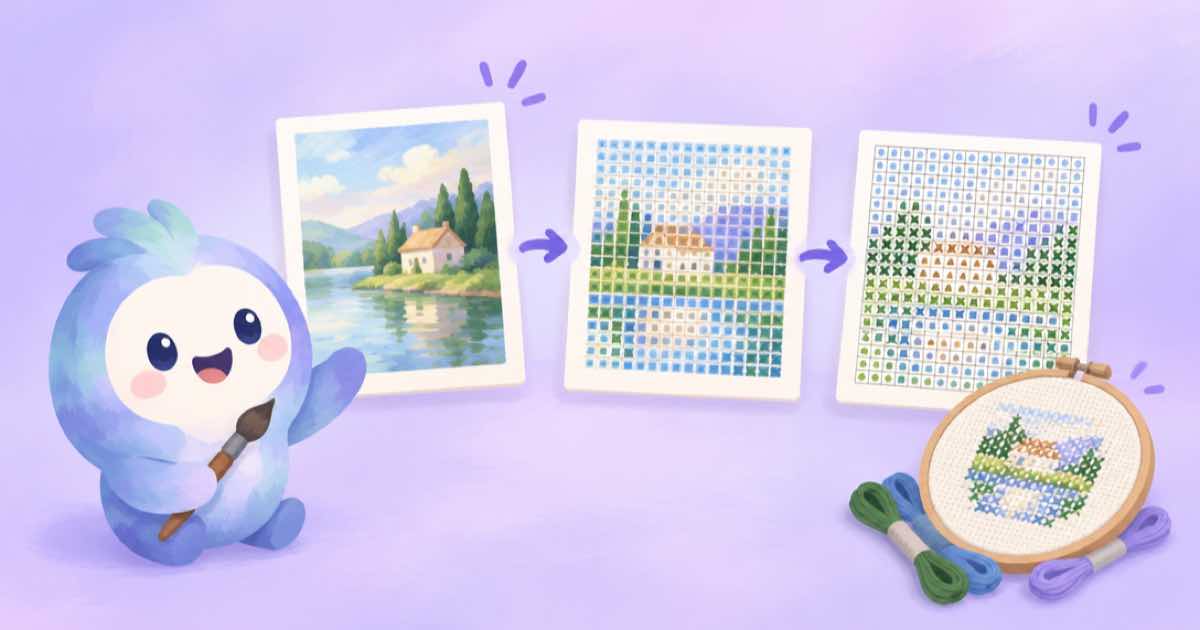
A cross-stitch pattern is a grid in which each square is one stitch in one colour, so the job is to turn an image into a small grid with few colours and a count per colour. An image model can supply simple art, and Pillow does the rest: shrink to the number of stitches across, reduce the palette, and count how many stitches each colour needs. The count is what tells you how much floss to buy.
Start from art made for the purpose. Bold shapes, solid colours and a plain background survive a 60-stitch-wide grid; photographic detail turns to noise. The prompt below asks for exactly that, and the code afterwards works on any image.
Generate art that survives a grid
Ask for a simple flat illustration with thick outlines, large shapes, six or fewer colours, a plain light background and nothing small. Use a square 1:1 ratio, which is listed on every catalog row, and a mid quality tier: a pattern grid hides fine detail, so extra quality is wasted (Sume Image API docs).
Generate a few variants with n: 4 and pick the one with the cleanest shapes. A busy composition will not become a readable chart no matter how many colours you allow.
import os, requests

r = requests.post("https://api.sume.com/v1/images", timeout=120, json={
    "model": "openai/gpt-image-2.5",
    "prompt": ("Simple flat illustration of a red fox sitting in grass, thick outlines, large "
               "shapes, six solid colors, plain cream background, no small details, no text"),
    "aspect_ratio": "1:1", "n": 4, "quality": "low",
}, headers={"Authorization": f"Bearer {os.environ['SUME_API_KEY']}"})
r.raise_for_status()
if r.status_code == 202:
    raise SystemExit("queued: poll the job status_url")
for i, item in enumerate(r.json()["data"]):
    print(i, item["url"])
Grid, palette and stitch count
The function below resizes with a box filter so each stitch takes the average of its area, quantizes to the colours you allow, and returns a count per colour. It also saves an enlarged chart where each stitch is a square, ready to print with your own symbols or a numbered legend.
Pick the width in stitches from the fabric you plan to use. The number of stitches wide and high, divided by the fabric's stitches per inch, gives the finished size, so check your fabric's count before choosing.
from collections import Counter
from PIL import Image

def stitch_chart(path, out, stitches_wide=60, colors=8, cell=12):
    img = Image.open(path).convert("RGB")
    h = round(img.height * stitches_wide / img.width)
    small = img.resize((stitches_wide, h), Image.BOX)
    q = small.quantize(colors=colors, dither=Image.Dither.NONE)
    pal = q.getpalette()
    counts = Counter(q.tobytes())
    chart = q.convert("RGB").resize((stitches_wide * cell, h * cell), Image.NEAREST)
    chart.save(out)
    return [(n, tuple(pal[i * 3:i * 3 + 3])) for i, n in counts.most_common()], (stitches_wide, h)

if __name__ == "__main__":
    demo = Image.new("RGB", (400, 400), "#f2e8cf")
    for x in range(100, 300):
        for y in range(120, 320):
            demo.putpixel((x, y), (190, 60, 40) if (x + y) % 90 < 60 else (60, 90, 150))
    demo.save("art.png")
    colors, size = stitch_chart("art.png", "chart.png", stitches_wide=40, colors=4)
    print(size, colors)
Checking the result
Look at the chart at actual size and ask whether you can still tell what it is. If it reads poorly, lower the palette-heavy parts of the prompt rather than raising the colour count: fewer, bolder shapes usually beat more colours.
Stitch counts per colour are a starting point for buying thread, not an exact figure. Allow for waste and for the few stitches the palette step merges. For other crafts that start from a clean image, see the sticker generator.
Sources
Related posts
More in Use cases
- AI embroidery patch design via API: transparent art, fewer colors
Generate flat patch art with a transparent background through GPT Image 2.5, then cut it to a fixed colour count in Pillow before you send it to a digitizer.
- AI enamel pin design via API: flat art and a die-line in Pillow
Generate flat enamel-pin art on a transparent background, count the fills, and draw a cut line around the alpha shape in Pillow. Code and checks included.
- AI illustrated map poster via API: art first, labels in code
Generate the illustrated map art at 2:3 with Nano Banana 2, leave the lettering out, then draw every place name in Pillow from a list so none are misspelled.
- AI memory match game cards: 8 pairs, one style, deck built in code
Make a memory-match deck with the image API: eight subjects in one style via a reference image, then duplicate, shuffle and lay out the deck in Pillow.
Written by Sume