
AI embroidery patch design via API: transparent art, fewer colors
Generate flat patch art with a transparent background through GPT Image 2.5, then cut it to a fixed colour count in Pillow before you send it to a digitizer.
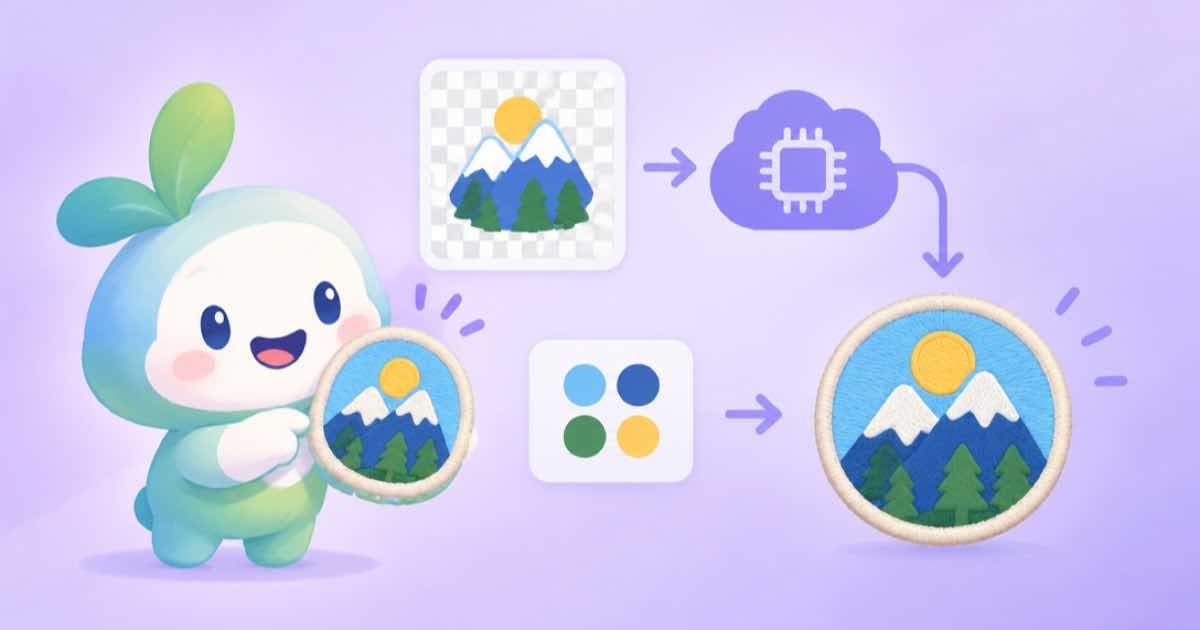
To design an embroidery patch with an image API, ask for flat, simple art on a transparent background, then reduce it to the small colour count your embroiderer will stitch. On Sume, openai/gpt-image-2.5 takes background: "transparent", so the cutout comes back with its alpha channel, and a few lines of Pillow turn the image into a limited palette you can hand over.
The model does the drawing; your code does the part a model is bad at, which is obeying a hard colour budget. Embroidery works in thread colours, and a painterly image with hundreds of shades does not translate. Ask your digitizer how many colours they will use and treat that number as a parameter. The rest of this post is the recipe.
Ask for the right kind of art
Patch art survives stitching when it has bold outlines, solid fills and no gradients. Say so in the prompt: a flat vector-style emblem, thick outline, five solid colours, no shading, centred, with lettering left out. Leave text out of the generation; ask the digitizer to stitch lettering as text, or add it to the file yourself.
Use a 1:1 ratio for a round or square patch. background accepts auto, transparent or opaque on ChatGPT Image 2.5 (Sume Image API docs); rows without that parameter reject it with 400 unsupported_parameter, so check the model's supported_parameters if you swap models. Use output_format: "png" so the alpha survives.
import os, requests

r = requests.post("https://api.sume.com/v1/images", timeout=120, json={
    "model": "openai/gpt-image-2.5",
    "prompt": ("Flat vector-style embroidered patch emblem of a fox head, thick dark outline, "
               "five solid colors, no gradients, no shading, no text, centered"),
    "aspect_ratio": "1:1",
    "background": "transparent",
    "output_format": "png",
    "quality": "medium",
}, headers={"Authorization": f"Bearer {os.environ['SUME_API_KEY']}"})
r.raise_for_status()
if r.status_code == 202:
    raise SystemExit("queued: poll the job status_url")
print(r.json()["data"][0]["url"], r.json()["usage"]["cost"])
Cut the palette in code
Download the PNG and reduce it to your colour count. The function below keeps the alpha channel as a hard edge (fully opaque or fully transparent, because thread has no semi-transparency), quantizes the visible pixels to N colours without dithering, and returns the palette with a pixel count per colour so you can see which fills are tiny and likely to be dropped.
It needs Pillow (pip install pillow). The demo builds a small synthetic image so it runs without a download.
from collections import Counter
from PIL import Image

def thread_palette(path, colors, out):
    img = Image.open(path).convert("RGBA")
    alpha = img.getchannel("A").point(lambda a: 255 if a > 127 else 0)
    q = img.convert("RGB").quantize(colors=colors, dither=Image.Dither.NONE)
    pal = q.getpalette()
    rgb = q.convert("RGB")
    rgb.putalpha(alpha)
    rgb.save(out)
    used = Counter(i for i, a in zip(q.tobytes(), alpha.tobytes()) if a)
    return [(n, tuple(pal[i * 3:i * 3 + 3])) for i, n in used.most_common()]

if __name__ == "__main__":
    demo = Image.new("RGBA", (64, 64), (0, 0, 0, 0))
    for x in range(64):
        for y in range(8, 56):
            demo.putpixel((x, y), (x * 4 % 256, y * 4 % 256, 120, 255))
    demo.save("demo.png")
    for n, rgb in thread_palette("demo.png", 4, "patch-4.png"):
        print(n, rgb)
What to send the digitizer
Send the reduced PNG with its palette, and say plainly that the colours are an approximation. A digitizer turns a raster into stitch paths by hand or with software, and they will choose thread codes and stitch types. The image is a design brief, not a stitch file.
For other cutout work see the AI sticker generator and transparent-background images. If a design looks muddy at five colours, regenerate with a simpler prompt rather than adding colours.
Sources
Related posts
More in Use cases
- AI illustrated map poster via API: art first, labels in code
Generate the illustrated map art at 2:3 with Nano Banana 2, leave the lettering out, then draw every place name in Pillow from a list so none are misspelled.
- AI memory match game cards: 8 pairs, one style, deck built in code
Make a memory-match deck with the image API: eight subjects in one style via a reference image, then duplicate, shuffle and lay out the deck in Pillow.
- AI postcard via API: 3:2 front art, address side drawn in code
Make a postcard front at 3:2 with GPT Image 2.5 custom pixels, then draw the back with message, address lines and a stamp box in Pillow. Code runs as written.
- AI shopping referrals up 693%: a Sume output schema for listing copy
Adobe data in KTVZ has AI referrals to US retail up 693.4% in Nov-Dec 2025. Bind a headline, hero image and alt-text schema so each video returns typed JSON.
Written by Sume