
3D-Printing Shop Product Clips: Reference Images With Wan 3.0
Show a printed part from several angles without a studio. Wan 3.0 on Sume takes 10 reference images; 4 seconds at 720p costs 50 cents.
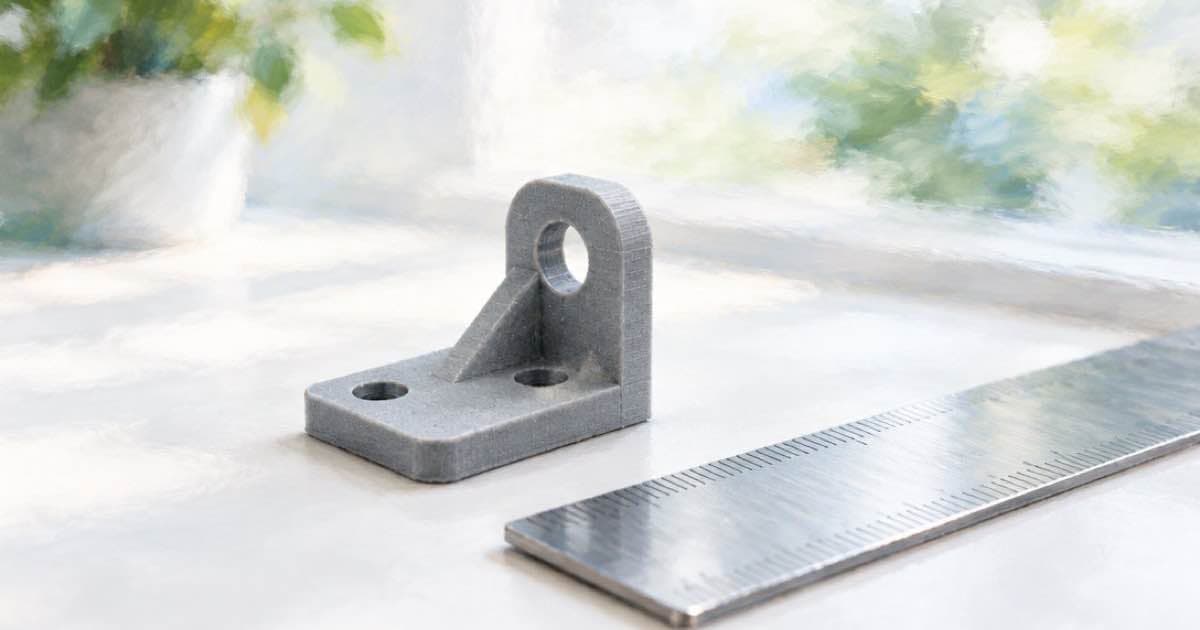
How can a 3D-printing shop show a printed part from several angles without a studio? Give Wan 3.0 several photos of the part as reference images and ask for a slow turntable-style move. Sume's wan-3.0 accepts up to 10 reference images, and a 4-second clip at 720p costs 50 cents.
Printed parts are small, glossy or matte, and hard to light. A short clip communicates scale and surface finish better than a single photo does.
Photograph the part, then clean the pictures
Take four to six phone photos: front, side, top, a close-up of the layer lines and one with a coin or ruler for scale. Plain paper under a window gives enough light. The more consistent the lighting across photos, the less the model has to reconcile.
Sume's rmbg-1.0 route costs 3 cents per image and removes the background from a real photo, which isolates the part from a cluttered workbench. This is a cutout of your own photograph. If a photo is small, the image-upscale route is a fixed 20 cents.
Feed the references to Wan
In Video Generation, wan-3.0 accepts up to 10 reference images, 5 reference videos and 5 reference audios, and clips of 2 to 30 seconds. Pass your cleaned photos as input_references and write a prompt about the camera only: a slow orbit, a gentle push toward the layer lines, a stop on the scale shot.
Keep the clip short. Four seconds is the right length for a listing thumbnail, and short clips leave less room for the model to redraw a thread or a hinge that is not on the real part.
| Step or model | Setting | Price |
|---|---|---|
| wan-3.0 | 4 s, 720p (12.5 cents per second) | 50 cents |
| wan-3.0 draft | 4 s, 480p (6.25 cents per second) | 25 cents |
| seedance-2-mini | 4 s, 480p | 36 cents |
| rmbg-1.0 | Per photo | 3 cents |
| image-upscale | Per photo | 20 cents |
The cost per part
For one part, five cleaned photos cost 5 x 3 cents = 15 cents. One 480p draft is 25 cents and the 720p final is 50 cents, so a part with a draft and a final comes to 15 + 25 + 50 = 90 cents. A shop with 50 parts spends $45.00 on listing video.
The wan figures follow list times 1.25: $0.10 per second at 720p becomes $0.125, and $0.05 at 480p becomes $0.0625.
Where this can mislead
A model can smooth layer lines, round a sharp edge or add a feature that does not exist. For functional parts such as brackets and gears, that is misleading. Describe the part truthfully in the listing text, and let the clip be a visual aid, not a specification.
Mention the material and the print resolution in writing, because the video cannot prove either. If dimensions matter, state them and show the scale photo. Honest listings reduce returns, which saves more than any cost of the clip.
Vertical or horizontal, and what to post
Marketplaces differ in what they accept, so pick the aspect ratio before you generate. Wan 3.0 takes an explicit aspect ratio in the request. A square or vertical clip works on social feeds, while a wide clip works on a shop banner.
Post the clip as the second image of a listing, after the clean hero photo and before the scale shot. Buyers who scroll will see motion, and buyers who read will still find the dimensions and material in the text.
Last, keep the cleaned photos together with the clip. If a customer asks for a colour variant, you can reuse the same set and change only the prompt.
If you sell on a marketplace that caps video length, trim the result with the video-trim route at $0.02 per job so it fits the limit exactly. That keeps the clip within the rule without a second generation, and the trimmed file is ready to upload as soon as the job completes.
Sources
Related posts
More in Use cases
- Can Sume add trending audio to a Reel? What it does and does not do
Instagram says trending audio can affect Reel distribution. Sume does not read or attach Instagram sounds; it makes original music and clip audio instead.
- Crochet Pattern Designer: Turn One Photo Into a Reel for 8 Cents
Animate a photo of your finished piece. Grok Imagine 1.5 on Sume needs exactly one image and costs 8 cents for 6 seconds at 720p; Wan 3.0 takes more control.
- Franchise With 40 Locations: One Ad Per Store With Bulk Runs
Queue one Format run per store in a single bulk request. A queue holds 1 to 100 items, runs at concurrency 1 to 16, and each run carries its own spend cap.
- Golf Instructor Lesson Videos: Where AI Helps and Where It Does Not
A golf coach should film the real swing. Sume handles the finishing: trim at $0.02, captions at $0.20, a music bed at $0.13 and a $0.10 per-minute render.
Written by Sume