
Double-exposure portrait from two photos with Nano Banana 2.1
Blend a portrait and a landscape into one double exposure: two input_references, a pinned 4:5 ratio, Nano Banana 2.1 at 1K, and the 10-reference cap on Sume.
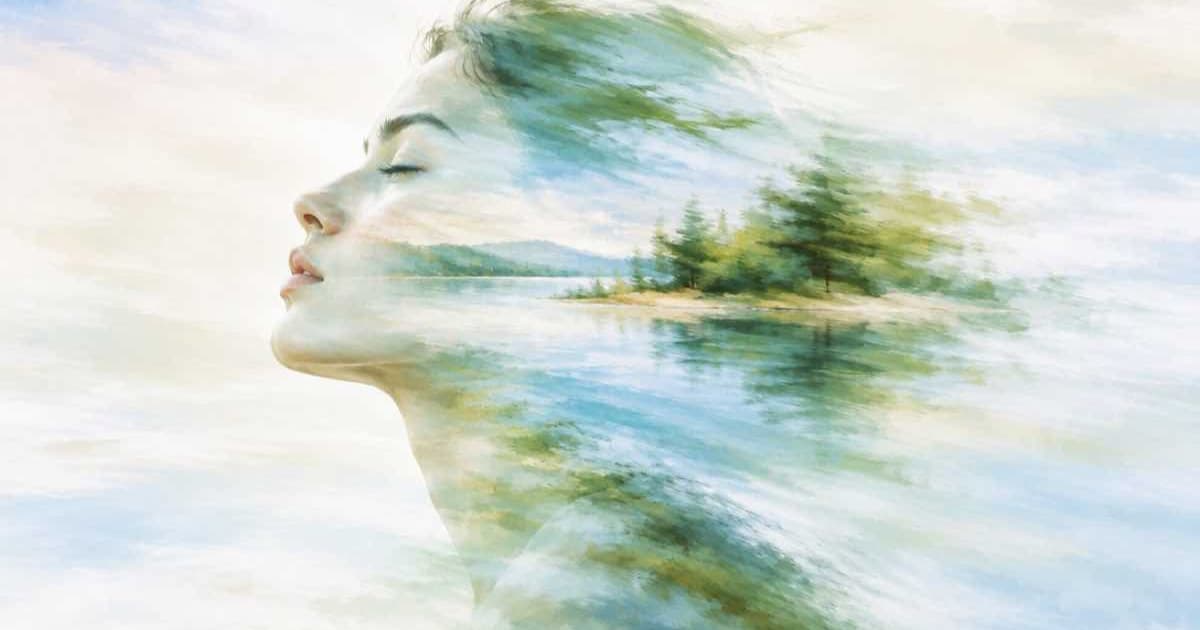
To make a double-exposure portrait on Sume, send two photos as input_references to google/nano-banana-2.1: a head-and-shoulders portrait first and a landscape second. Pin aspect_ratio to 4:5 and describe the effect in the prompt. The Sume catalog lists 15 ratio values for this row, so 4:5 is available, and one image at 1K is priced at the row's endpoint rate, which is $0.10 in the catalog I read.
Why two references and not a prompt alone?
A double exposure needs two real pictures: the silhouette and the texture that shows through it. Google's Nano Banana 2.1 model page describes multi-image fusion with up to 14 reference images. Sume's catalog caps input_references at 10 for this row, so a two-photo blend is well inside the limit on both sides.
Order the references the way you describe them. Say "the first photo is the silhouette, the second photo fills it" so the model does not have to guess.
Which request fields do I need?
Sume copies the OpenRouter image schema. Reference URLs must be public HTTPS; localhost and private-network URLs are rejected before submission. If you omit aspect_ratio on an edit, the result is not the same as auto, so here I pin the ratio that suits a portrait print.
| Field | Value | Note |
|---|---|---|
model | google/nano-banana-2.1 | The retired nano-banana-2 id runs as this row |
input_references | two image_url entries | Sume cap is 10; Google's page says 14 |
aspect_ratio | 4:5 | One of 15 values the row lists |
resolution | 1K | Rows list 512, 1K, 2K and 4K; Google's default is 1K |
n | 1 | Raise only after the first result looks right |
What does the code look like?
The prompt carries the whole effect, so keep it concrete about where the second photo shows.
import os
import requests

def ref(url):
    return {"type": "image_url", "image_url": {"url": url}}

body = {
    "model": "google/nano-banana-2.1",
    "prompt": "Double exposure. The first photo is the silhouette of "
              "the person in profile; the second photo fills that "
              "silhouette. Pale background, soft contrast.",
    "input_references": [ref("https://example.com/portrait.jpg"),
                         ref("https://example.com/forest.jpg")],
    "aspect_ratio": "4:5",
    "resolution": "1K",
}
r = requests.post("https://api.sume.com/v1/images",
    headers={"Authorization": f"Bearer {os.environ['SUME_API_KEY']}"},
    json=body, timeout=60)
if r.status_code != 200:
    raise SystemExit(f"{r.status_code}: {r.text[:200]}")
print(r.json()["data"][0]["url"])
How do I iterate without overspending?
Nano Banana 2.1 lists four resolution tiers on Sume: 512, 1K, 2K and 4K, and 0.5K is accepted as an alias for 512. Test the pairing of two photos at 512, which is the cheapest tier, then rerun the winner at 1K or 2K. Sume's docs say failed and cancelled generations are not billed, while every completed one is, so each retry of a pairing that works is a cost you chose.
Can I mask where the second photo appears?
Not on this row. Sume's mask_url field is listed only for ChatGPT Image 2.5, and Google's model page does not mention a mask for Nano Banana 2.1. Steer placement with words instead, or use the GPT row with a mask if you need an exact region. If the call returns 202, read the image from the job result as described in Jobs and results.
Sources
Related posts
More in Use cases
- eBay listing video: no URLs or calls to action, check before upload
eBay's images, videos and text policy bars contact details, links and calls to action in listing video. Check stills and speech on Sume before you upload.
- Game devlog video with no voice-over: captures, a bed, cue cards
Build a 45-second devlog from gameplay captures: trim each clip, render on a silent spine with a music bed, then burn feature names as cues. $0.525.
- Game patch notes video: dim the capture, one caption card per change
A patch notes video is gameplay dimmed 50 percent, then one caption card per change. Dim is $0.02 with a free check; the cards are $0.20 for up to 60 s.
- Google Ads promotion occasions: Q4 dates and a creative set per window
Google lists Black Friday as Oct 15 to Dec 15 and Christmas from Nov 1. See the overlaps, the 6-month rule, and how to batch one creative set per window.
Written by Sume