
AI battle map for tabletop RPGs: square image, grid drawn in code
Generate a top-down battle map on Sume at $0.15 for a 2K square, then draw the grid in Pillow so squares are exact. Revise one room with a reference edit.
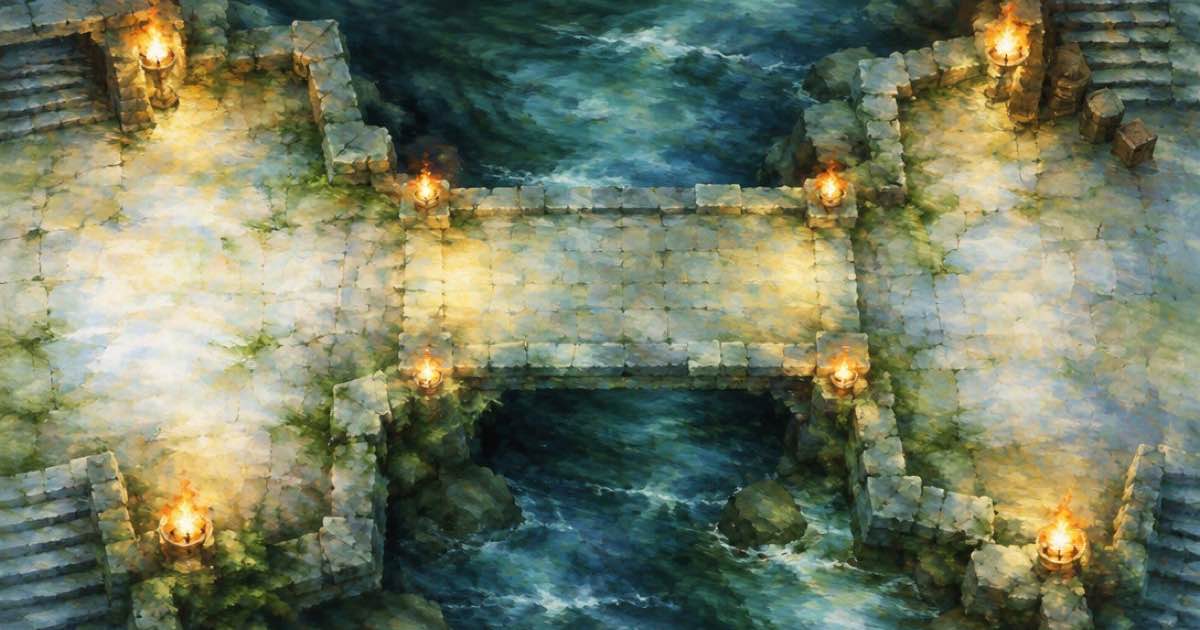
To make a battle map for a tabletop game, generate a top-down square image with no grid and no text, then draw the grid yourself in code so every square is the same size. On Sume, Nano Banana 2.1 (google/nano-banana-2.1) at the 2K tier costs $0.15 for a 1:1 map, and Seedream 5.0 Lite (bytedance-seed/seedream-5-lite) costs $0.04375 if you are drafting many rooms.
Models draw grids that wander: lines drift, squares change size and a 30-by-30 map ends up with 27 columns. A grid is arithmetic, so draw it in code over a clean map. Prices and limits below come from the Image API page and Sume's catalog code, read on 2026-10-11.
Step one: a map with no grid and no labels
Ask for a top-down orthographic view, name the room's contents, and exclude text, grid lines and characters. Positive wording works better than a list of exclusions, so say "bare stone floor, no markings" rather than only "no grid". Keep the aspect_ratio at 1:1 for a map that tiles to a square grid, or choose 4:3 when your table holds a landscape printout.
import os, requests

r = requests.post(
    "https://api.sume.com/v1/images",
    headers={"Authorization": f"Bearer {os.environ['SUME_API_KEY']}"},
    json={
        "model": "google/nano-banana-2.1",
        "prompt": "Top-down battle map of a flooded crypt with a stone bridge, bare flagstone floor, torchlight, no grid, no text, no characters",
        "aspect_ratio": "1:1",
        "resolution": "2K",
    },
    timeout=60,
)
r.raise_for_status()
print(r.json()["data"][0]["url"] if r.status_code == 200 else r.json()["data"]["status_url"])
Step two: draw the grid
Pick the number of squares across, divide the image width by it, and draw lines at integer multiples. The script reads the size from the downloaded file, so it does not depend on any pixel size from the catalog.
from PIL import Image, ImageDraw

def add_grid(src, dst, squares=28, color=(255, 255, 255, 70)):
    img = Image.open(src).convert("RGBA")
    w, h = img.size
    cell = w / squares
    layer = Image.new("RGBA", img.size, (0, 0, 0, 0))
    draw = ImageDraw.Draw(layer)
    for i in range(squares + 1):
        x = round(i * cell)
        draw.line([(x, 0), (x, h)], fill=color, width=2)
    for j in range(round(h / cell) + 1):
        y = round(j * cell)
        draw.line([(0, y), (w, y)], fill=color, width=2)
    Image.alpha_composite(img, layer).convert("RGB").save(dst, "PNG")

add_grid("crypt.png", "crypt_grid.png")
Which row for which job
Square is the one ratio every edit-capable row lists, so you can swap models without changing the request. Choose by how many drafts you expect to throw away.
| Sume model id | Price per map | Ten drafts | Notes |
|---|---|---|---|
| google/nano-banana-2.1 at 1K | $0.10 | $1.00 | Tiers 0.5K to 4K |
| google/nano-banana-2.1 at 2K | $0.15 | $1.50 | Sharper tokens and doors |
| bytedance-seed/seedream-5-lite | $0.04375 | $0.4375 | No resolution tier listed |
| black-forest-labs/flux.2-pro | $0.0375 | $0.375 | No resolution tier listed |
Revise one room without redrawing the map
Sume's image calls are stateless, so a revision is a fresh call that includes the previous map as a reference. Send the map URL in input_references, ask for one change ("add a wooden drawbridge across the water, change nothing else") and set aspect_ratio to auto on Nano Banana 2.1 so the shape stays the same. Each revision is a full priced generation: $0.15 at 2K. Three revisions on top of a first map cost 4 x $0.15 = $0.60.
Save a PNG between passes, because a JPEG re-encode adds noise that later edits can amplify. Result URLs are signed Sume-hosted links, so download each pass before you continue.
Sizing the map for print and screen
Pick the grid first and the image second. A common table scale is one inch per square, so a 28-square map prints at 28 by 28 inches, usually split across tiles, while a virtual tabletop import only needs the square count. Decide how many squares you want across (20 for a small room, 30 to 40 for a cavern), then set the squares value in the script. The script uses the width of the file you downloaded, so it works with any resolution.
A square image also gives you clean cropping: cut a 2K map into four quarter rooms and run the grid script on each piece with a smaller squares value. If a room needs a feature the model drew badly, such as a door sitting on a wall corner, do not fight it in the prompt; paint that spot out in an image editor or send one reference edit for it. Keep the original download, since each model pass changes the whole picture a little.
Limits
If a 2K generation takes longer than the 30-second wait, Sume returns 202 and a job; the second sample prints the status_url in that case, and Jobs and results shows how to fetch the finished image. Any generation that fails is not billed.
Treat map art as scenery. Doors, secret passages and scale are decisions for the game master, so mark them on the grid layer or in a separate overlay instead of relying on what the model painted.
Sources
Related posts
More in Use cases
- App preview video that loops and works muted: first and last frame
Apple says previews autoplay, repeat and are usually muted. Use one image as first and last frame so the loop has no jump, with generate_audio off.
- App Store creative assets must be 4+, even for a 17+ app
Apple's asset rule: every App Store asset must meet a 4+ rating whatever the app's own rating. A review table for generated art, and a $1.20 candidate-set cost.
- App Store creative assets: no prices, discounts or URLs in the art
Can a Black Friday app asset say 40% off? Apple's asset rules bar pricing, discounts and URLs. What to leave out, and how to generate art with room for type.
- Audio-reactive music visualizer: does Sume render waveforms?
No waveform or spectrum bars in Sume's docs. What ships: a still held over your audio on a timeline, or a video model that takes audio as a reference.
Written by Sume